Address window
The address window allows you to enter and change an address.
It can be called up at various locations in the user interface and allows you to enter and change an address.
The left-hand area allows you to enter an address in the newer SEPA 3.7 format, which has existed since approx. 2023/2024. The right-hand area is for compatibility with older SEPA versions.
The red/green circles indicate whether a valid address has been entered in the corresponding tab.
The upper fields, which are marked with an *, are mandatory fields.
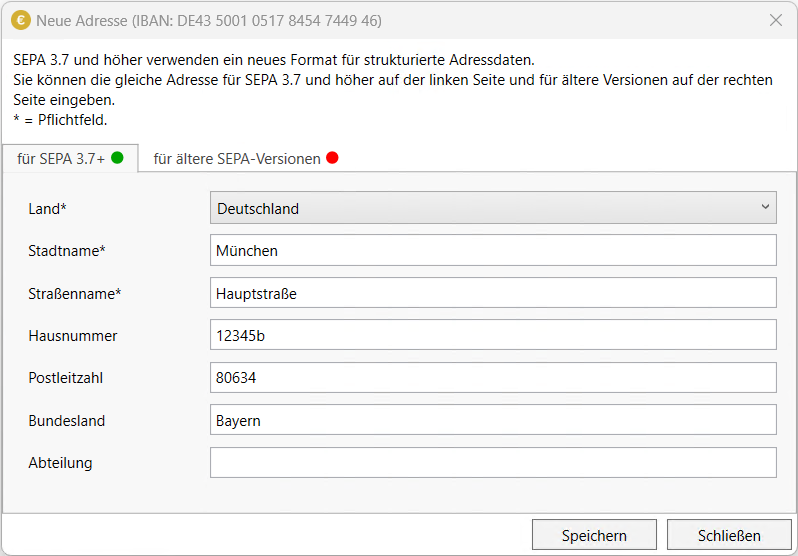
- Country
The country (a selection of countries within the SEPA area) (mandatory field)
- City name
The name of the city (mandatory field)
- Street name
The name of the street (without house number) (mandatory field)
- House number
The house number (can also contain letters, e.g. 25a)
- Zip code
The zip code
- Federal state
The federal state (in Germany), or for other countries its sub-areas
- Department
The department (optional)
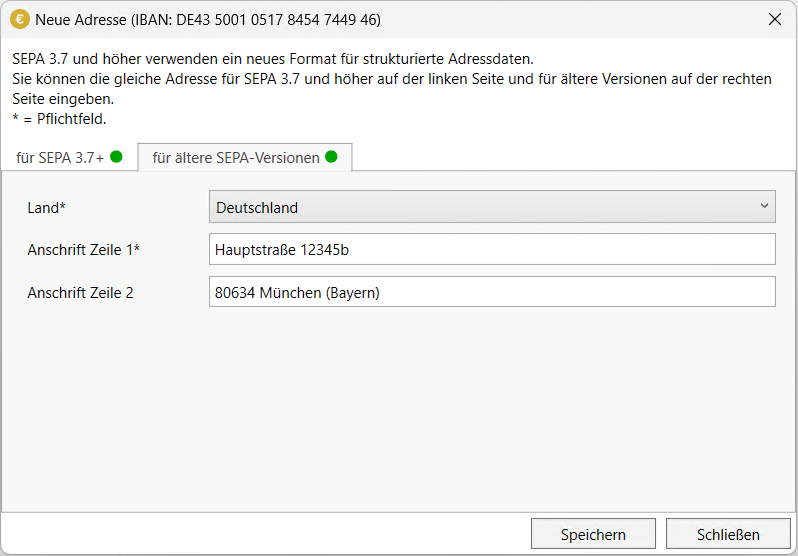
- Country
The country (a selection of countries within the SEPA area) (mandatory field)
- Address line 1
The first line of the address (mandatory field)
- Address line 2
The second line of the address