Template management
Template management provides an overview of the existing templates for an account and offers various options for managing them and creating transactions.
Opening template management
You can open the template management via the “Create from template” button in the “Edit” tab.
Overview
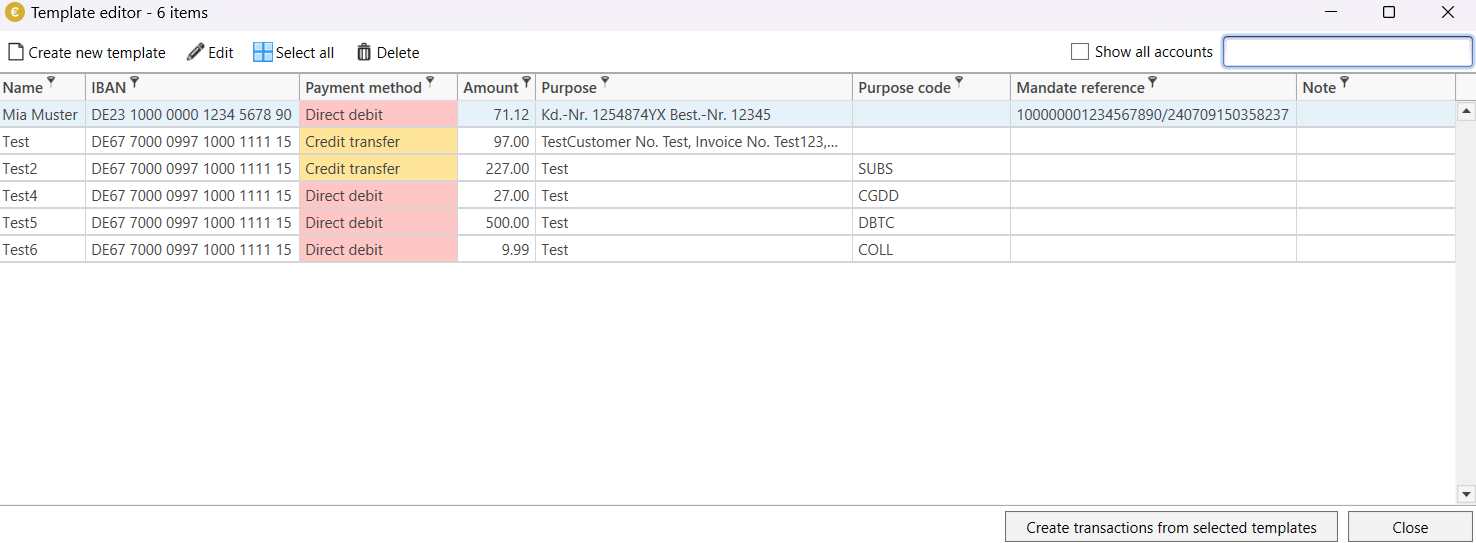
The dialog offers the following functions:
- Create new template
Opens a dialog to add a new template for the current account.
- Edit
Opens the edit dialog for the selected template. Only one template can be edited at a time.
- Select all
Selects all templates.
- Delete
Deletes the selected templates.
- Filter
You can enter a name or purpose in this text field to limit the number of templates displayed.
- Show all accounts
If this option is activated, templates from other accounts are also displayed.
- Create new booking(s)
Creates new bookings from the selected templates.
- Only transfer account data
If you activate this option, only the account data of the template is transferred to the booking. Data such as the amount remains empty. If this option is deactivated, all saved data is transferred.
- Close
Closes the dialog without creating a new booking.