Transfer via e-mail
SEPA-Transfer allows you to pack the generated SEPA files into a ZIP archive and send it to your bank by e-mail. The archive should be provided with a freely selectable password, which must be known to the recipient of the file.
To do this, the corresponding option Export Settings “Send bookings by email” must be activated in the Settings dialog. If you enter a password in the field below, the file can only be unpacked from the archive with the help of this password. Leave this field blank so as not to protect the archive (not recommended).
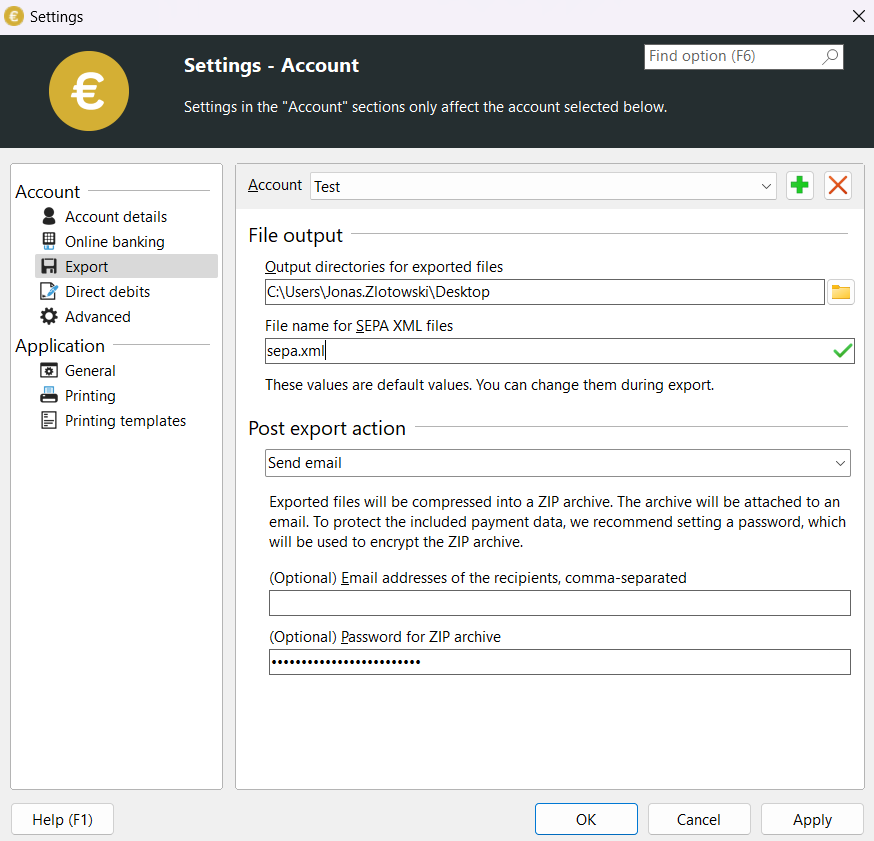
You can now enter your bookings as usual. Then select the menu item “Create SEPA file”. An archive with the name sepa.zip will now be created instead of the sepa.xml file and added to the attachment of a new e-mail, provided you have an e-mail program installed.
The recipient’s address must now be entered and the e-mail can be sent.
If you close the window of your e-mail program without sending the file, it will still be available in the standard folder that you have selected for saving in the “Program settings” and can be processed further as required.